Friday, December 30, 2016

New Farm Advertising Campaign

We have done very little advertising for the farm since we launched Little Sprouts some 6 or 7 years ago. The customer list has grown slowly from a dozen to a few hundred in that time by word of mouth, interviews, etc.  But as we approach 2017, and have left the off farm income behind, there is a desperate need to speed things up.

So, we have launched a new advertising campaign. It is primarily based on "doodle" add, where a hand draws the story on a whiteboard in a video.  I personally love that format! It is entertaining, crisp, simple.  So here we go!

At this point, all of the ads are made in-house, with some special software.  It has been a learning curve and challenging, but below you can see the first results! Yep.. I know.. it looks amateurish. That's ok.. we are amateurs! Constructive feedback is appreciated, but lets keep in mind that no professionals are involved.. so keep expectations realistic!

The Ads themselves are, for now,  graphics and music. The combination of audio and visual tells the story without narration, well that's the goal anyway... so be sure to turn on the sound as you watch.


Save The Children


Monday, December 26, 2016

New Favorite Recipe: Turkey Dressing

This Christmas dinner we tried something new, and it worked out unbelievably wonderfully, so we would like to share this with you.

We very very rarely touch breads, but Christmas dinner is one time where we will splurge a little... with dressing. But the turkeys we made were smoked long and slow, so doing the stuffing inside the birds is next to impossible. The question then is how do you get that stuffed turkey taste from dressing made in the oven?

It is actually quite easy... fat! The realization came from thinking "what gives dressing cooked inside the bird that amazing flavor?". The main difference is, dressing inside the bird soaks up all the fat that renders out while cooking, fat from skin and suck. Based on that, I came up with the following recipe and it was nothing short of AMAZING.

Broth - make your own by boiling some giblets (hearts, gizzards, livers, etc) in a small amount of water with a few peppercorns, a quartered onion, and a pinch of salt. The amount is roughly 2 cups per box of bread crumbs, but check the dressing box for recommend proportions.

Fat - remove all the fat possible from inside the turkey. A heritage turkey properly raised will have about a handful of orange or deep yellow fat inside the body cavity and around the neck area. pull all that you can out and put in a small pot to render slow on the stovetop. If there is not enough rendered fat for the amount of dressing desired, add sticks of grass fed butter to it. Again, use the dressing box as a guide, but use about 50% more total fat then they suggest.

Veggies - my favorite is equal parts onion, carrot, celery. Chopped to quarter inch or so pieces

Garlic - Peel an entire head of garlic and mince it up with a knife

Stuffing mix - we use 1/3 wheat dressing, 2/3 corn dressing

Now your ready to build... First mix the chopped veggies and garlic to the dry dressing mix. Gently mix this together in a large bowl by slowly flipping.  Then add the liquid broth slowly as you continue flipping gently. Be gentle as to not break up the bread any more than necessary.  When it is all uniform and the moisture is pretty much all soaked in (about 10 to 15 minutes) then add the liquid  fat, preferably warm. Again, flip slowly to coat all evenly without breaking the bread apart.

Now just shovel this into a flat glass baking dish and cover with foil. Then into a hot oven at 350 degrees for about half an hour.  Check, it should be bubbly at the bottom. If so, remove the foil and continue baking another half hour or so, until the top is brown and a little crispy.

There you go! The best dressing ever, made in the oven, taste like it comes from a bird.

NOTE: do NOT try this with a storebought turkey. They wont have enough fat, and what they do have is not healthy anyway due to raising and feeding.  This will only work with a heritage turkey raised where it can get access to lots of bugs.

Saturday, December 24, 2016

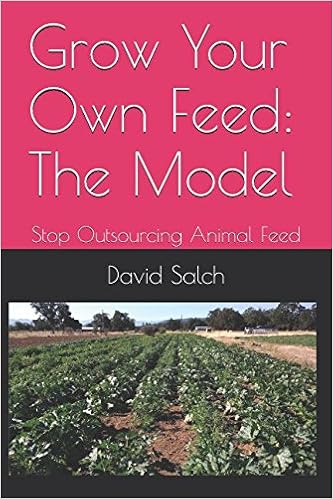
First book in paperback on Amazon

Just in time for Christmas, our first book is now available in paperback on the amazon website. It's definitely exciting to see the book on amazon.. Actually surreal is a better term.


You can order it here: https://www.amazon.com/dp/1520227116

This is being fulfilled through "print on demand" service, which is great for a new author! They actually print the books, one at a time as they are ordered. that way there is not the huge investment up from in making the first shipment of books on speculation.

It is also available now in Amazon as a kindle download through this  link:https://www.amazon.com/dp/B01NGZ5LUX


Hopefully this is the beginning of a new trend in small farms making healthy foods across america!

Merry Christmas!


Thursday, December 22, 2016

New product - guinea fowl

For the first time ever, we have organs, feet and necks from guinea fowl available for purchase in the online store. Son we will have the whole birds available also.

These are the birds we are using for biological pest control in our animal feed gardens. The flock is retired in the winter and a new flock hatched next spring. (Otherwise the birds would eat the whole winter garden!). So that means they are almost exclusively bug fed all year as their natural diet, and totally free ranging as they stand guard protecting the garden from bugs.

The feet and heads make excellent medicinal stock, loaded with collagen, cartilage, minerals and all sorts of medicinal nutrients. Just put in a small stock pot with water, maybe add some onion, realsalt, cap of vinegar and a few black peppercorns then simmer for several hours.

The organs can be cooked as any organ meat, added to a variety of dishes for extra nutrients in almost anything.

To try these, better hurray, supplies are limited! (But more are coming as the weather improves).

Converting ODT to EPUB or MOBI using Calibre

This post will likely seem off topic for the typical readers of our blog. It is concerning the process of publishing eBooks. Now that we are deep into the throws of the publishing world, these details are a big part of daily life!

Background: The books I am writing are being written in Libre Office on Ubuntu, saved as .ODT files. The conversion to PDF is simple, as Libre office has a "export to pdf" function that works amazingly well and all features of Libre seem supported in the resulting near perfect PDF file.  PDF is fine for self publishing and distributing off a website such as this, but none of the major eBook retailers support PDF. 

The reason is simple... PDF is a really cool and flexible set design format. It allows creativity to place objects and text around the page as in written works. EBook reader, however, do not accept PDF.  They prefer a format that allows restructuring on the fly to fit a variety of screen sizes and shapes and resolutions. this presents a problem for PDF becasue  the exact thing that PDF is best for, fixed structure, is something not allows in the ebook reader world. These readers work more like a web browser, dynamically flowing text to match as things are scaled up and down on various platforms. 

So, The next step in our process was converting to EPUB and MOBI (for Barns &Noble and Kindle respectfully).  WOW, what an experience this was! I chose to use the converter software called Calibre becasue has the highest recommendations and most control. Calibre will acept many formats and spit out many other formats, mostly right. What it cant do is deal with a fixed structure format in a flowable world.  This caused many hours of searching the help pages, the internet, and finally trial and error.  There just isn't much information available because of the vast number of possibilities of input format to output format. 

I wanted to document what I learned specifically about converting ODT to EPUB using Calibre on Ubuntu. (I dont thin the OS matters at all, but worth mentioning). Here is the list of issues to deal with that are not well documented:

A. Graphics and captions

Libre Writer allows frames to hold the captions of graphics in a nicely formattable way.  NOT COMPATIBLE WITH CALIBRE! The frames themselves do not get interpreted properly and mess up the page.  The only option seems to be:
  1.  remove captions and paste graphics only (anchored to paragraph text)
  2. Place the cations into the graphics themselves
B. Table of Contents

Libre Writer does a fabulous job of building and maintaining a table of contents automagically. Unfortunately this is wholly incompatible with Calibre.  Instead, use the Calibre "create table of contents" feature based on headers in the document, and remove the embedded table of content entirely. This is ok, as it actually makes no sense to leave it. EBOOKS have no page numbers, because the pages are fluid as the text flows to fit. The Calibre created TOC is not based on page numbers, but clicks to go there. That works well.  Unfortunately this does mean keeping two copies of a finished doc, one with TOC for PDF, and one without TOC for EPUB

C. Track Changes

Calibre has this interesting quirk, anything it doesn't understand is just thrown into the front of the ebook, sort of like its saying "I don't know about his part, so look here first. Changes pending under the Libre "track changes" feature are one of those that it doesn't understand. Be sure to accept or reject all changes within the document before conversion to EPUB. 

D. Page Breaks

Calibre will add page breaks where it or you wants to. This si controllable in the conversion settings. You can choose which level of headings create breaks, H1, H2, N3, etc.  The default is to break after both H1 and H2. This is easily adjustable if its not what you want.

E. Embedded fonts

If you care about the final look and formatting, embed the fonts used. Dont depend on the font being available on the reader device. Substitute fonts are never perfectly alike and causes weird changes.  This is easily settable in the conversion setting of Calibre

F. Tables

this is perhaps the most difficult one! Tables are a way of force formatting text on a page. Again, totally incompatible with the goal of eBook readers.  There are options on this:

  1. Do not use tables, organize in some text only fashion that makes sense
  2. Use tables and let Calibre "flatten them", which pretty makes the table unreadable
  3. Use Tables and let Calibre leave them tables, which makes them mostly unreadable since they fall off the edge of the reader screen into oblivion
  4. Build the table in a graphic program, save as an image, and paste it into the document
Number four is the only one that truly works and preserves the layout of the table. It is a pain though since it means more objects to manage to build a book when changes are necessary. 

E. Cover
Several options on what to do with a cover. Calibre can expect an outside file as the cover, but if you do that and also produce PDF, you must maintain two copies again (one with and one without cover embedded).  What I ended up doing is making a full page graphic for the cover, text and all, and putting that on the first page of the document.  then do not tell Calibre to use a graphic nor to use the first page. Just leave all cover settings alone. That produces a PDF and EPUB that look identical with no intervening steps. 

One thing I did do is to set Calibre to scale the cover proportionally... that preserves the look of the cover as it stretches onto different device screens. 

F. Properties

Calibre is supposed to pick up "customer document properties" from Libre Writer, but I have not been able to get this to work. What that means (if I cant solve it) is that each time a new file is converted, you have to enter the properties like author, publisher, etc manually. You do what these to allow for better searching within the ebook retailer. 

That's about it for now...  Nearly at a usable EPUB file !